
How to Build an AI Content Workflow That Doesn’t Trash Your SEO
Let me guess — you’ve tried using AI to write blog posts, hit publish, and then sat there refreshing your analytics waiting for traffic that never showed up.
Yeah. Been there.
Here’s the honest truth: AI can be one of the most powerful tools in your blogging toolkit. I’ve personally used ChatGPT to level up my content quality and speed up my writing. But — and this is a big but — only when I learned to give it the right prompts and the right strategy behind them.
The problem isn’t AI. The problem is most beginners use AI like a vending machine. They type in a topic, grab whatever comes out, and post it. No keyword research. No strategy. No human touch. And then they wonder why Google isn’t sending them any love.
In this guide, I’m going to walk you through how to build a simple AI content workflow that actually helps your SEO instead of hurting it. This is built for complete beginners — no fancy tech experience needed. Just follow the steps, do the work, and watch what happens.
Let’s get into it.
What Is an AI Content Workflow, and Why Does It Matter?
An AI content workflow is just a fancy way of saying: a repeatable system for using AI tools to help you plan, write, and publish blog posts that search engines actually want to rank.
Think of it like cooking. If you just throw whatever’s in the fridge into a pan, you might end up with something edible. But if you follow a recipe in the right order, you get something worth sharing. A workflow is your recipe.
Without a workflow, most beginners end up doing one of two things. They either:
- Spend hours writing everything from scratch (slow, exhausting, and unnecessary), or
- Let AI do all the work with zero strategy (fast, but Google ignores it)
A good AI workflow sits right in the middle. You use AI to move faster. But you supply the strategy, the direction, and the human touch that makes the content worth reading.
That combination is what gets you ranked.

The #1 Mistake Beginners Make With AI Content
Ask ten beginners what ruins AI content and most will say something like “it sounds robotic” or “Google detects AI.” Fair concerns — but those aren’t the real killer.
The #1 mistake beginners make is this: they skip keyword research and just start prompting AI to write.
Here’s what that looks like in real life. You get excited about a topic. You open ChatGPT. You type “write me a blog post about passive income.” You copy what it gives you. You hit publish. You wait.
Nothing happens. Not because the content is bad. But because you never checked if anyone is actually searching for that exact topic in a way that could bring them to your site.
Keyword research tells you three critical things:
- What words your audience actually types into Google
- How many people are searching for that topic each month
- How hard it will be to rank for it (competition level)
Without that information, your AI is just writing into a void. It doesn’t matter how well-written the post is — if it’s not targeting a real, searchable keyword, Google doesn’t know who to show it to.
The fix is simple: do your keyword research first, then bring in AI. Always. Every single time.
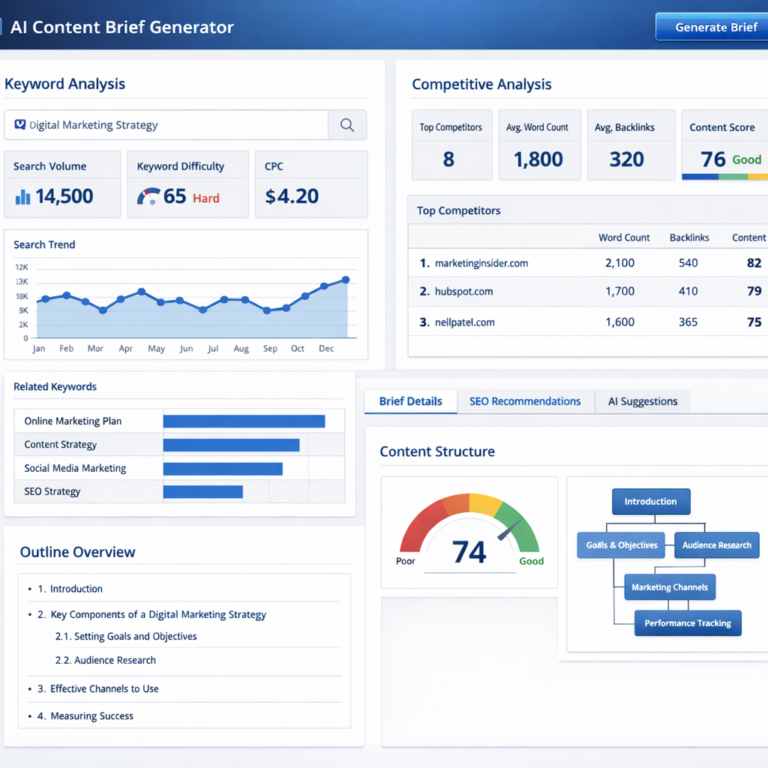
Free tools like Ahrefs’ free keyword generator make it easy to find real search terms without paying a cent. Type in your topic, see what people are searching for, and pick one that makes sense for your site’s current authority level.
🔑 Pro tip: As a newer site, go after “long-tail” keywords — phrases with 3 or more words that are very specific. They have lower competition and easier ranking potential. Example: instead of “affiliate marketing,” try “best affiliate programs for beginners with no website.”
Want to go deeper on how SEO and content work together to build real traffic? The SEO for Affiliate Marketing guide on this site lays it all out in plain English — highly recommend starting there if you’re new to this.
Why AI Is Actually Great for SEO (When You Use It Right)
Okay, let’s give AI some credit here — because used the right way, it’s genuinely remarkable.
Here’s what AI can do for your content that would take you much longer to do alone:
It helps you write faster without starting from zero. Instead of staring at a blank screen for an hour, you get a solid draft in minutes. Then you spend your energy improving it — not creating it from scratch.
It helps you cover topics more completely. AI can suggest angles, subtopics, and related questions you might have missed. This leads to more thorough content, which Google tends to reward.
It helps you stay consistent. When you give AI your brand voice and clear instructions, you get content that feels like you — post after post. No more “this one sounds human, this one sounds like a robot” problem.
It helps you match search intent. When you tell ChatGPT exactly what keyword you’re targeting and what kind of reader will search for it, the output gets dramatically better. Specificity is everything.
According to Google’s helpful content guidelines, the goal is simple: create content that’s made for people first. AI helps you produce that content faster — but the “for people” part still has to come from you.
Ready to see how to actually do this? Here’s the workflow.
Your 5-Step AI Content Workflow (Built for Beginners)
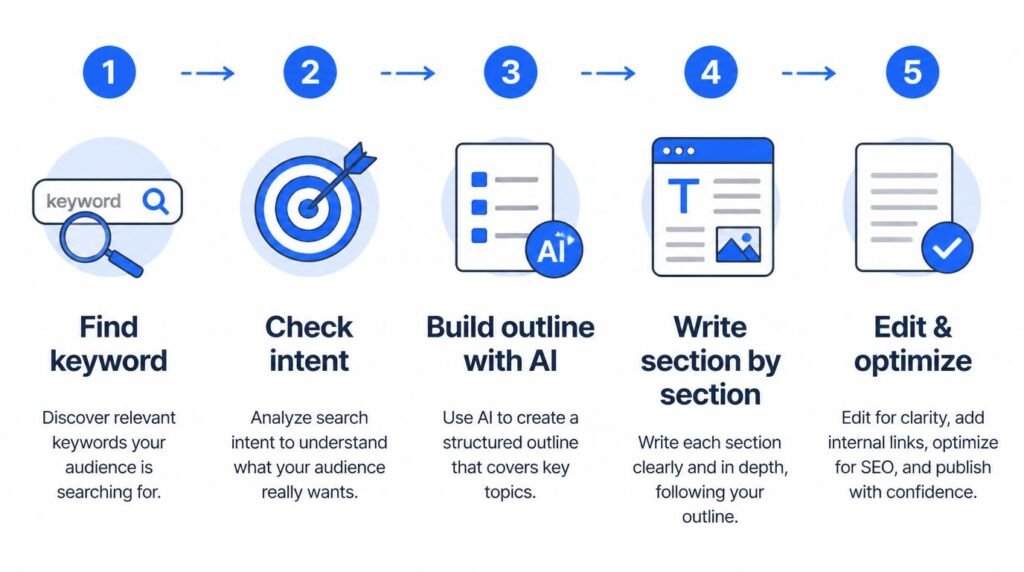
This is the system. Follow these five steps every time you write a post and you’ll be way ahead of most bloggers out there.
Step 1: Find Your Keyword First (Always)
Before you open ChatGPT, spend 10–15 minutes on keyword research. You’re looking for a keyword that:
- Has real monthly search volume (even 200–500 searches/month is fine when you’re starting out)
- Matches what a real person would type into Google
- Isn’t completely dominated by massive authority sites
Write it down. This keyword is your north star for everything that follows.
Step 2: Understand Why People Search That Keyword
This is called “search intent” — the reason behind the search. Before you write a single word, go to Google and type in your keyword. Look at the top 5 results.
- Are they how-to guides? Write a how-to guide.
- Are they listicles? Write a listicle.
- Are they comparison posts? You get the idea.
Google is already telling you what format ranks. Match it.
Step 3: Build Your Outline With AI
Now open ChatGPT. Use this prompt:
“I’m writing a blog post targeting the keyword [YOUR KEYWORD]. The search intent is informational — the reader wants to learn how to do something. Write me a detailed outline for a 2,000-word blog post that covers this topic thoroughly for a complete beginner. Include an intro, 5–6 main sections, and a FAQ.”
Review the outline. Move things around. Add your own ideas. Remove sections that don’t fit. You’re the editor — AI is just the assistant.
Step 4: Write Each Section With Targeted Prompts
Here’s the part most people skip: write section by section, not the whole post at once. For each section, give ChatGPT focused context:
“Write a 250-word section for my blog post. The heading is [SECTION HEADING]. I’m targeting the keyword [KEYWORD]. Tone: friendly and encouraging, like a mentor talking to a beginner. Avoid fluff and get to the point.”
Read each section as it comes out. Rewrite anything that doesn’t sound like you. Add a personal experience or observation wherever you can. Even one real sentence from your life changes the whole feel of a post.
Step 5: Edit, Add Your Voice, and Optimize
This is the most important step — and the one most people rush. Before you hit publish:
- Read the whole post out loud. If it sounds robotic, rewrite those parts.
- Cut any sentence that doesn’t add value. AI loves to pad; your job is to trim.
- Add internal links to related posts on your site
- Plug it into Rank Math. Check your focus keyword score. Fix what it flags.
- Add your personal take somewhere — a lesson you learned, something you tried, something that surprised you.
If you’re not sure what other systems you need as a beginner, the Start Here roadmap on this site is a great place to map it all out — it shows you how content, traffic, and monetization connect.
Backlinko’s annual SEO research consistently shows that content with real E-E-A-T signals — meaning Experience, Expertise, Authoritativeness, and Trustworthiness — outranks surface-level optimized content. That personal voice you add in Step 5? That’s your E-E-A-T. Don’t skip it.
Watch This Before You Write Your Next AI Post
Before you try this workflow, take 15 minutes and watch this breakdown from Neil Patel. He walks through how SEO is changing with AI — and what you actually need to do to stay ahead. It’s practical, clear, and great for beginners.
Video: Neil Patel — “How To Do SEO” (YouTube). Watch the full breakdown on his channel for more SEO strategy tips.

5 Habits That Keep Your AI Content Human (and Google-Friendly)
Let’s be clear: Google does not hate AI content. What Google hates is lazy, unhelpful content. The goal isn’t to hide that you used AI — it’s to make sure your content is genuinely worth reading. Here’s how to do that consistently:
1. Always add one personal insight per post. It doesn’t have to be a long story. One sentence like “When I first tried this, I made this mistake…” is enough to make the whole article feel real and trustworthy.
2. Replace vague AI phrases with specific examples. AI loves to write things like “many marketers find that…” Cut that. Replace it with something concrete: a tool name, a number, a real scenario your reader will recognize.
3. Cut the fluff every single time. AI pads its writing. Your job is to trim it. If you can delete a sentence without losing meaning, delete it. Shorter, cleaner, clearer content performs better.
4. Fact-check everything. AI can confidently state things that are flat-out wrong. Before you publish any stat, claim, or tool recommendation, verify it with a quick Google search. Don’t let AI embarrass you.
5. Write like you’re talking to one person. Your reader is a real human who found your post while Googling a problem they’re stuck on. Speak to them directly. Use “you.” Be warm. Be helpful. That tone is what builds a loyal audience.
For a list of tools that help with SEO optimization, editing, and workflow automation, check the Recommended Tools page — it’s updated regularly with what’s actually worth your time and money.
Research from Search Engine Land confirms that AI-assisted content that’s been properly edited and enhanced with real human experience performs just as well — and sometimes better — than fully manual content. The edit is what makes it work.
💡 Quick reminder: You’re not trying to trick Google. You’re trying to help your reader. Keep that as your north star and the SEO stuff tends to follow naturally.
Frequently Asked Questions
Q: Will Google penalize me for using AI to write my blog posts? Not automatically, no. Google’s goal is to reward helpful, high-quality content — regardless of how it was made. What Google penalizes is content that’s low-effort, unhelpful, or spammy. If your AI-assisted post is genuinely useful and well-edited, you’re in good shape.
Q: Do I need to tell readers I used AI? There’s no Google requirement to disclose AI use. That said, being transparent tends to build more trust with readers. Many successful bloggers simply note that they use AI as a production tool while making sure every post is reviewed and edited by a human.
Q: What’s the best AI tool for a beginner starting today? Start with ChatGPT (GPT-4 or GPT-4o). It’s beginner-friendly, well-documented, and powerful enough to handle blog outlines, full sections, FAQ drafts, and even meta descriptions. Once you’re comfortable with the workflow, you can explore other tools.
Q: How long does it take to write a post using this workflow? Once you’ve practiced the five steps a few times, expect to spend 2–4 hours on a 2,000-word post — including keyword research, writing, editing, and Rank Math optimization. That’s significantly faster than writing everything from scratch, and the quality gets better with every post.
Q: What if I have no personal experience with the topic I’m writing about? Great question. Be honest about where you are. You don’t need 10 years of experience — you need to have done the research and provide real value. Share what you’ve learned, what tools you tried, what questions you had when you started. Your beginner perspective is actually a huge asset to readers who are also beginners.
Q: My keyword research feels overwhelming. Where do I even start? Start with Google itself. Type your topic into the search bar and look at the autocomplete suggestions — those are real things people are searching for. Then scroll to the bottom and check “People also ask” and “Related searches.” That alone will give you a solid list of keyword ideas. Free tools like Google Keyword Planner or Ahrefs’ free generator take it a step further.
Q: Can I use AI for every part of the blog post? Technically yes, but I’d encourage you not to. Use AI for the heavy lifting — drafts, outlines, FAQ answers, meta descriptions. But always write your intro yourself, add personal observations throughout, and do your own final edit. That’s what separates a forgettable AI post from a post people actually share.
Q: How do I know if my AI content is hurting my SEO? Watch your Google Search Console for impressions and clicks. If you’re publishing regularly but seeing no growth in either, your content may lack search demand (wrong keywords), search intent match (wrong format), or quality signals (needs more editing and E-E-A-T). Use Rank Math’s content score as a quick health check before every publish.
My Final Recommendation for Beginners
If you’ve made it to the end of this post, I want to say something to you directly:
You don’t need to be perfect at this. You just need to start — and start with the right order of steps.
Most beginners lose months of momentum because they’re trying to shortcut the strategy. They want AI to do the hard thinking. But here’s the truth: the hard thinking is what makes your content valuable. The keyword research, the search intent check, the editing — those steps are where the real work lives.
AI is there to make you faster. You are there to make it smarter.
So here’s my recommendation: pick one blog post topic this week. Spend 20 minutes on keyword research before you open ChatGPT. Build an outline. Write one section at a time. Add your voice. Edit it until it sounds human. Then publish it.
Do that 10 times and you’ll have a content system that compounds. You’ll start seeing traffic. You’ll start building authority. And you’ll wonder why you ever tried doing it any other way.
You’ve got this. Seriously.
Ready to Build Your Full Online Income System?
Grab the free No-BS Blueprint and get a clear roadmap showing you exactly how to build content, attract traffic, and turn it all into income — step by step, no fluff, no recycled hype.Get the Free Blueprint →
This post was written with AI assistance and reviewed by Danilo G. Some links on this page may be affiliate links, which means MakeMoneyQ may earn a small commission at no extra cost to you. All recommendations are based on genuine usefulness.