Internal Linking Strategy for Small Websites: Proven Guide
Your internal linking strategy for small websites is probably working against you right now. I know that sounds harsh, but after auditing dozens of sites with under 50 pages, I keep finding the same pattern: links scattered everywhere, pointing to random posts, creating a structure that Google can’t make sense of — and honestly, neither can your readers. The problem isn’t that you’re not linking. It’s that you’re linking without a map. The agitation? Every month you publish more content, you add more random connections, and your site’s topical signal gets weaker — not stronger. The fix is surprisingly brutal and surprisingly effective: you strip everything back, pick one focused topic cluster, and rebuild your linking from zero.
That’s exactly what this piece walks you through. Not theory. A working reset plan I’ve used on my own sites and on client projects where the results showed up in Search Console within weeks.
Table of Contents
- Why Most Small Websites Get Internal Linking Completely Wrong
- What Internal Linking Actually Does for SEO (And What It Doesn’t)
- Step 1: Audit, Strip, and Reset Your Current Links
- Step 2: Choose One Topic Cluster and Commit
- Step 3: Rebuild Your Internal Link Architecture From Scratch
- How to Write Anchor Text That Helps Instead of Hurts
- Advanced Tactics: The Moves Most Small-Site Owners Never Make
- Maintaining and Expanding Your Link Structure Over Time
- Frequently Asked Questions
- My Top Recommended Gear
Why Most Small Websites Get Internal Linking Completely Wrong
Quick Answer: Most small websites fail at internal linking because they link reactively — adding links as an afterthought during publishing — instead of proactively building a deliberate content structure around a single topic cluster. This creates a fragmented link graph that dilutes topical authority and confuses search engine crawlers.
Here’s what I see on almost every small blog I audit: the owner publishes a post about email marketing, then one about SEO, then something about social media, then a recipe (don’t laugh — I’ve actually seen this). Each post gets two or three internal links tossed in during editing, usually to whatever other post the author happened to remember at the time.
The result? A site architecture that looks like a plate of spaghetti thrown at a wall.
Google’s crawlers follow your internal links to understand what your site is about and which pages matter most. When your links point everywhere and nowhere simultaneously, you’re sending a signal that says, “I’m about everything,” which Google translates as, “You’re about nothing.” Research from Moz’s guide on internal linking consistently shows that organized internal link structures outperform scattered ones — especially for smaller domains competing against bigger players.
Small websites don’t have the luxury of brute-force authority. You can’t outlink a site with 10,000 pages. But you can out-focus one. That’s the entire premise of what comes next.
What Internal Linking Actually Does for SEO (And What It Doesn’t)
Does internal linking directly boost your rankings? Sort of. But not the way most people think.
Internal links do three things that matter for small website SEO:
- Crawlability: They help Googlebot discover and index your pages. If a page has zero internal links pointing to it (an “orphan page”), Google may never find it — or may decide it’s not important enough to rank.
- Topical relevance signaling: When you link related pages together using descriptive anchor text, you tell Google, “These pages belong to the same topic.” This reinforces your on-page SEO signals and builds what SEO professionals call topical authority.
- PageRank distribution: Internal links pass authority (or “link equity”) between your pages. A smart linking structure channels that equity toward the pages you most want to rank.
What internal linking does NOT do: it doesn’t replace backlinks, it doesn’t fix thin content, and it won’t save a page that targets a keyword with zero search volume. I mention this because I’ve seen small-site owners spend weeks perfecting their internal links while ignoring the fact that their keyword research for low-authority sites was fundamentally flawed. Fix the foundation first.
Step 1: Audit, Strip, and Reset Your Current Links
Before you build anything new, you need to know exactly what you’re working with. And I’ll warn you — this step is where most people quit because the mess is bigger than they expected.
How do I find all my existing internal links?
I use Screaming Frog’s free version (it crawls up to 500 URLs, which is more than enough for a small site). Run a crawl, export the “Inlinks” report, and you’ll see every internal link on your site — where it comes from, where it points, and what anchor text it uses. Google Search Console’s “Links” report gives you a simpler version of this under “Internal Links.”
What you’re looking for:
- Orphan pages — posts with zero internal links pointing to them
- Irrelevant links — connections between pages that share no topical relationship
- Broken links — 404 errors that waste crawl budget and frustrate readers
- Over-linked pages — one page getting 20+ internal links while others get none
Once you have this data, you can make ruthless decisions. If a link connects two unrelated posts, remove it. If a post doesn’t fit your core topic at all, consider whether it belongs on your site. I know that sounds extreme for content you spent hours writing, but holding onto dead weight actively hurts your content structure. Run through a thorough SEO audit checklist for new blogs to catch everything systematically.
Step 2: Choose One Topic Cluster and Commit
Why just one? Isn’t that limiting?
Here’s the counterintuitive truth that took me years to accept: a small website trying to cover five topics will lose to a small website covering one topic deeply. Every time. Google’s helpful content guidelines explicitly reward sites that demonstrate depth and expertise within a focused subject area. Spreading thin is the single most common SEO strategy mistake I see on sites with fewer than 30 posts.
So how do you choose your one cluster?
- Look at your Google Search Console data. Which topic already drives the most impressions and clicks?
- Count your existing posts per topic. Where do you already have the most content?
- Assess your actual expertise. What can you write about with genuine depth and first-person experience?
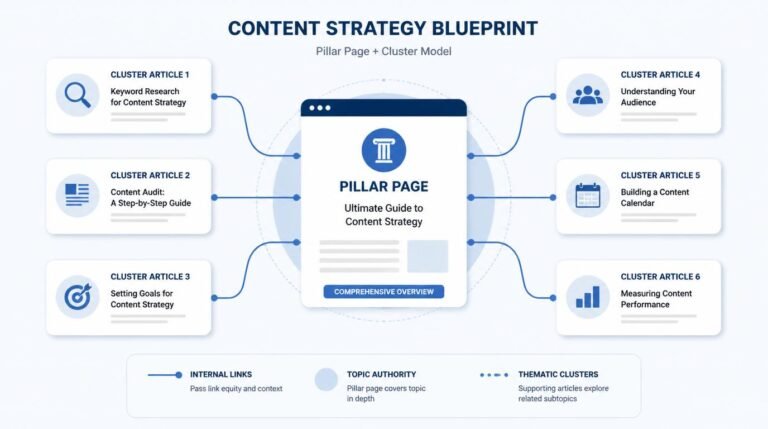
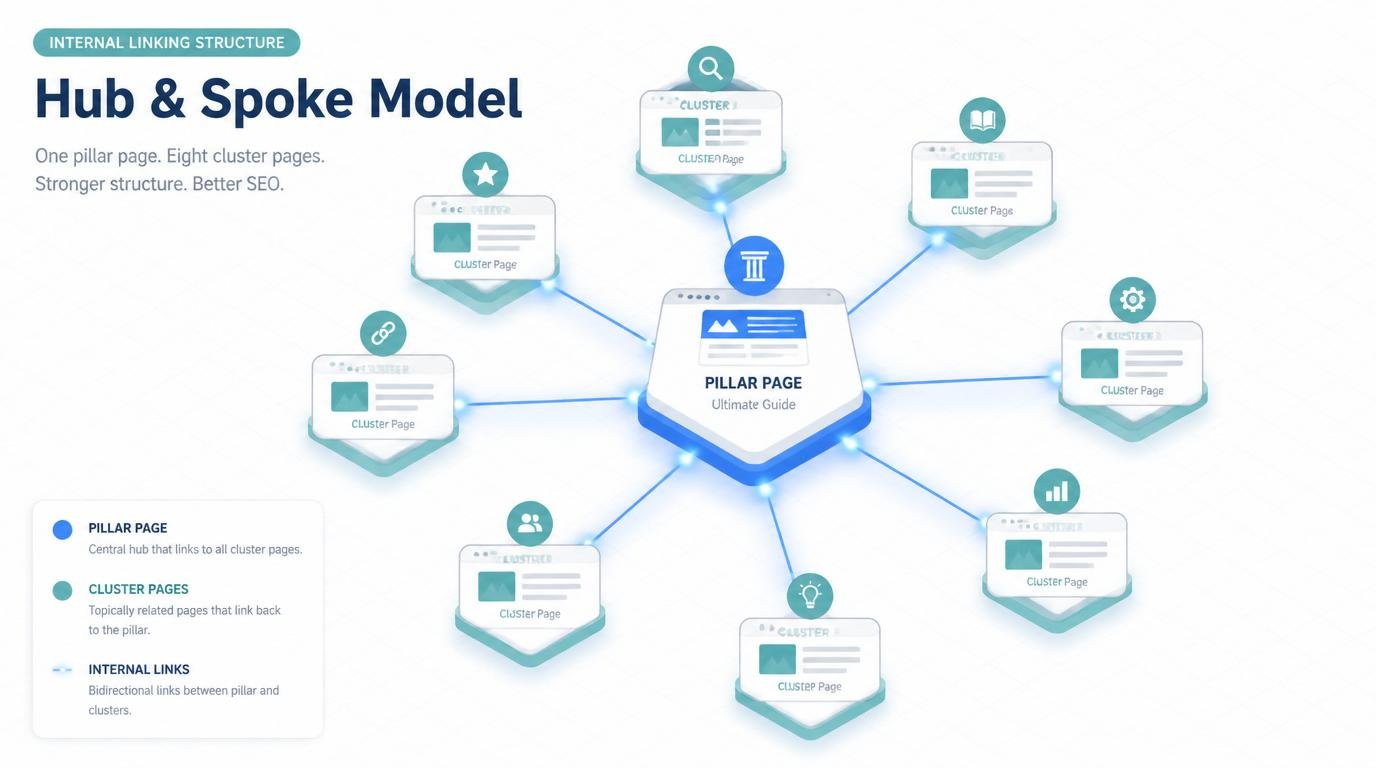
The intersection of those three factors is your cluster. Name it. Define a pillar page — one comprehensive post that covers the broad topic. Then map out every supporting subtopic page that branches off that pillar. I typically aim for 8 to 15 cluster pages for a small site. That’s enough to demonstrate authority without spreading resources too thin.
TBH, the hardest part isn’t choosing the cluster. It’s accepting that everything outside that cluster needs to either be repurposed, redirected, or deprioritized. But this is where the magic happens — and where most of your competitors will never have the discipline to go.
Step 3: Rebuild Your Internal Link Architecture From Scratch
Now comes the part that actually moves the needle. You’ve audited. You’ve stripped. You’ve chosen your cluster. Time to rebuild.
What does a hub-and-spoke linking model look like in practice?
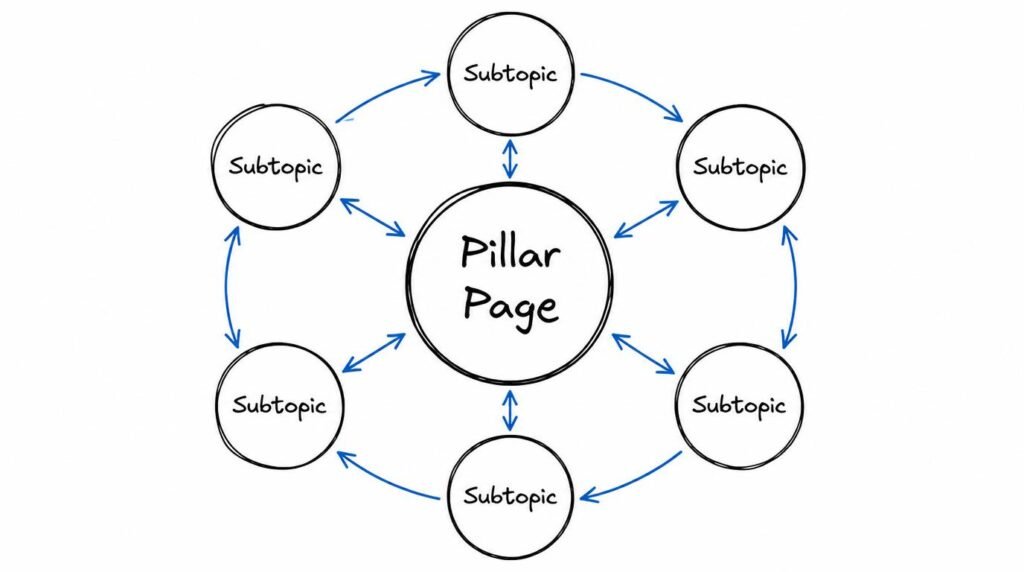
Think of your pillar page as the hub of a wheel. Every cluster page is a spoke. The rules are simple:
- Every cluster page links up to the pillar page
- The pillar page links down to every cluster page
- Cluster pages link sideways to other related cluster pages (but only when contextually relevant — don’t force it)
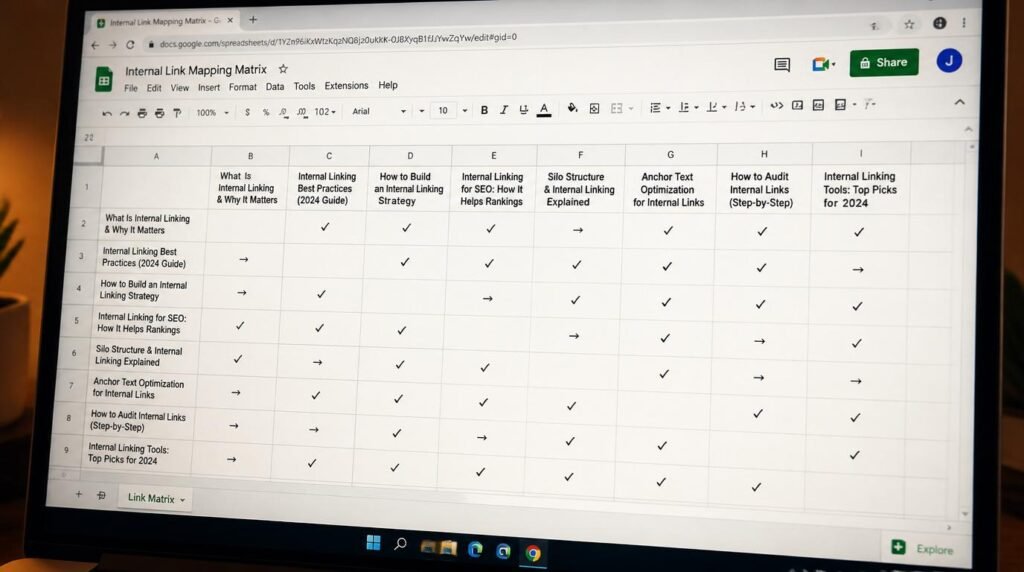
I open a spreadsheet, list every page in the cluster, and map out exactly which pages link to which. Old school? Sure. But it works better than any fancy tool because it forces you to think about each connection deliberately.
Here’s an example from one of my own sites. My pillar page targets “blog SEO” broadly. One cluster page covers on-page optimization, another covers traffic generation through SEO, another covers technical setup for beginners. Each of those pages links back to the pillar, the pillar links to all of them, and pages that share a natural topical overlap — like on-page optimization and content structure — link to each other within the body text.
The result? Google saw a tight, interconnected web of content about one subject. My pillar page jumped from position 34 to position 9 in about six weeks. No new backlinks. No new content. Just restructured internal links.
How to Write Anchor Text That Helps Instead of Hurts
Anchor text is where a lot of small-site owners accidentally sabotage themselves. They either use the exact same keyword phrase on every link (which looks manipulative to Google) or they use meaningless phrases like “this post” or “read more” (which tells Google absolutely nothing about the destination page).
What’s the best anchor text formula for internal links?
I follow a simple rule: describe the destination page in 3 to 7 words that a human would naturally use in conversation. If I’m linking to a page about SEO for affiliate sites, my anchor text might read “SEO tactics specifically for affiliate marketing” one time, and “SEO for affiliate marketing” another. Natural variation. Always descriptive. Never generic.
According to Google’s own documentation on links, anchor text helps their systems understand the context of the linked page. You’re literally giving Google a label for your content. Make it count.
Advanced Tactics: The Moves Most Small-Site Owners Never Make
Ready to go deeper than the surface-level advice? Good. Because this is where a small site starts punching above its weight. IMO, these three tactics separate sites that plateau at 500 monthly visitors from sites that break through to 5,000+.
Why should you link from high-authority pages to new content first?
Not all pages on your site carry equal weight. Some pages have earned backlinks from external sites. Some get consistent organic traffic. These pages hold more “link equity” — and when you add an internal link from one of these pages to a new post, you’re funneling that equity directly where you need it.
I check Google Search Console for my top-linked pages, then I make sure every new cluster post gets at least one internal link from a high-authority page within 48 hours of publishing. This accelerates indexing and gives the new page a ranking head start.
The “content gap” internal link trick nobody talks about
Here’s something I stumbled onto accidentally. When you audit your cluster, you’ll find subtopics you haven’t written about yet — gaps in your coverage. Instead of just noting them for future content, I create placeholder entries in my link map. The moment I publish the new piece, I already know exactly which existing pages should link to it and vice versa. This turns content planning into link planning. Two birds, one spreadsheet.
And here’s the part that surprises people: I’ve found that planning internal links before writing the content actually makes the content better. You write with structural awareness. You naturally reference related subtopics because you know the connections exist. Your blog SEO improves not just mechanically, but qualitatively.
Expert Commentary: This walkthrough from Ahrefs breaks down exactly how internal links pass authority between pages using real crawl data — worth watching because it visualizes the flow of link equity in a way that makes the abstract concept immediately actionable for small-site owners.
Maintaining and Expanding Your Link Structure Over Time
What happens after the initial reset? Do you just set it and forget it?
Absolutely not. An internal linking strategy is a living system. Every new post you publish changes the map. Every post you update should trigger a review of its outgoing and incoming links.
Here’s my maintenance rhythm:
- Every new publish: Add the new post to my link map. Go back to 3 to 5 existing cluster pages and insert a contextual link to the new post. Add links from the new post to 3 to 5 existing cluster pages.
- Monthly quick check: Run Screaming Frog. Look for broken links, new orphan pages, and pages that have fallen out of the cluster structure.
- Quarterly deep audit: Reassess the entire cluster. Should I expand to a second cluster? Are there posts that should be consolidated or pruned? Is the pillar page still the strongest page?
This ongoing discipline is what separates sites that build website traffic steadily from sites that spike and flatline. It’s not glamorous work, but it compounds. Every new link you add strengthens the entire cluster, and the cluster strengthens every individual page within it. Search Engine Journal’s internal linking research confirms that sites with regularly maintained internal link structures see measurably better crawl efficiency and ranking stability.

Frequently Asked Questions
How many internal links should a small website have per page?
For small websites with under 50 pages, aim for 3 to 7 contextual internal links per post. Every link should connect to content within your primary topic cluster. Avoid linking to unrelated pages just to increase link count — relevance beats volume every time.
What is a topic cluster and why does it matter for internal linking?
A topic cluster is a group of related pages organized around one pillar page. The pillar covers a broad subject, and cluster pages target specific subtopics, all linking back to the pillar and to each other. This structure helps search engines understand your site’s topical authority and distributes link equity efficiently across a small website.
Can internal linking alone improve my small website’s rankings?
Internal linking alone won’t catapult you to page one, but it is one of the most underused on-page SEO levers for small sites. A focused internal linking strategy helps Google crawl and index your pages faster, establishes topical relevance, and keeps visitors on your site longer — all of which contribute to improved rankings over time.
Should I delete old blog posts that don’t fit my topic cluster?
Not necessarily. First, check if the post gets any organic traffic or backlinks. If it does, consider updating and repositioning it within your cluster. If it earns zero traffic and has no external links, you can safely remove it or redirect the URL to a relevant cluster page to consolidate authority.
How do I choose the right anchor text for internal links on a small site?
Use descriptive, keyword-relevant anchor text that tells both readers and search engines exactly what the linked page covers. Avoid generic phrases like “click here” or “read more.” Vary your anchor text slightly across pages to avoid over-optimization, but always keep it contextually accurate.
How often should I audit my internal links?
For small websites, run a full internal link audit every 60 to 90 days. Every time you publish a new post, revisit 3 to 5 existing posts to add contextual links to the new content. This keeps your link graph fresh and ensures new pages get discovered by search engines quickly. 🙂
My Top Recommended Gear
These are tools and resources I actually use when building and maintaining internal link structures on small sites. Nothing here is filler — each one has saved me real hours.
- Ahrefs Webmaster Tools (Starter Guide Book) — I recommend this for anyone getting serious about site audits. The internal link analysis reports alone justify the learning curve, and the book breaks down how to interpret crawl data without needing an SEO background.
- Dot Grid Notebook for Content Planning — Sounds old-fashioned, but I map every topic cluster by hand before I touch a spreadsheet. The physical act of drawing hub-and-spoke diagrams helps me see structural gaps I miss on screen.
- Portable Second Monitor (15.6 inch USB-C) — Running Screaming Frog on one screen and your CMS on another cuts audit time in half. I picked up a portable USB-C monitor specifically for this workflow, and it’s been worth every penny.
Disclaimer: This post contains affiliate links. As an Amazon Associate, I may earn a commission from qualifying purchases at no additional cost to you. I only recommend products I’ve personally tested or rigorously researched.