

Master AI and Automation for Beginners: Quickstart
Table of Contents
- What Is AI and Automation (And Why Should You Care)?
- 3 Myths About AI for Beginners I Need to Kill Right Now
- AI vs. Automation: They’re Not the Same Thing
- The No-Code Automation Tools That Actually Matter
- Machine Learning Basics: The 5-Minute Version
- Build Your First Workflow Automation in 20 Minutes
- Advanced Tactics: Where Beginners Become Dangerous
- FAQ
- My Top Recommended Gear
What Is AI and Automation (And Why Should You Care)?
AI and automation for beginners means using intelligent software and rule-based systems to handle repetitive work, make smarter decisions, and free up your time for tasks that actually require a human brain. It combines artificial intelligence (software that learns and adapts) with automation (systems that execute tasks without manual input).
Here’s the problem: you’re spending 40% of your workweek on tasks a machine could handle in seconds. I’m talking about data entry, email sorting, report generation, social media scheduling—the stuff that makes you question your career choices by 3 PM on a Tuesday. And it’s getting worse. The more tools you add to your stack, the more manual glue-work you create between them.
Now here’s what really stings. Your competitors—yes, even the small ones—already figured this out. They’re using AI and automation to run leaner operations while you’re still copy-pasting data between spreadsheets. According to the U.S. Bureau of Labor Statistics, AI adoption is actively reshaping employment projections across every major industry.
The solution? You don’t need a computer science degree. You don’t need a six-figure budget. You need a clear starting point and about 30 minutes of focused effort. That’s exactly what this beginner AI guide delivers.
3 Myths About AI for Beginners I Need to Kill Right Now
I’ve spent over a decade watching people psych themselves out of using AI tools because of garbage advice they read online. Let me set the record straight.
Myth #1: “You Need to Know How to Code”
Nope. The entire no-code automation movement exists specifically because most people don’t code—and shouldn’t have to. Tools like Zapier, Make, and n8n give you drag-and-drop interfaces that connect your apps without writing a single line. I built my first automated email funnel in 2019 using nothing but Zapier and a Gmail account. Zero code. Worked perfectly.
Myth #2: “AI Is Going to Replace Me”
Research from the Yale Budget Lab shows that AI exposure hasn’t correlated with increased unemployment—at least not yet. What I’ve seen firsthand is that AI replaces tasks, not people. The people who get left behind are the ones who refuse to learn the tools. IMO, that’s the real risk.
Myth #3: “It’s Too Expensive to Start”
Most automation tools have generous free tiers. Zapier gives you 100 tasks/month free. Make offers 1,000 operations/month. ChatGPT has a free version. You can build a genuinely useful automation stack for exactly $0. If you’re new here, check out my Start Here page for a full breakdown of free tools I personally recommend.
AI vs. Automation: They’re Not the Same Thing
This is where most beginner AI guides get sloppy, so let me be precise.
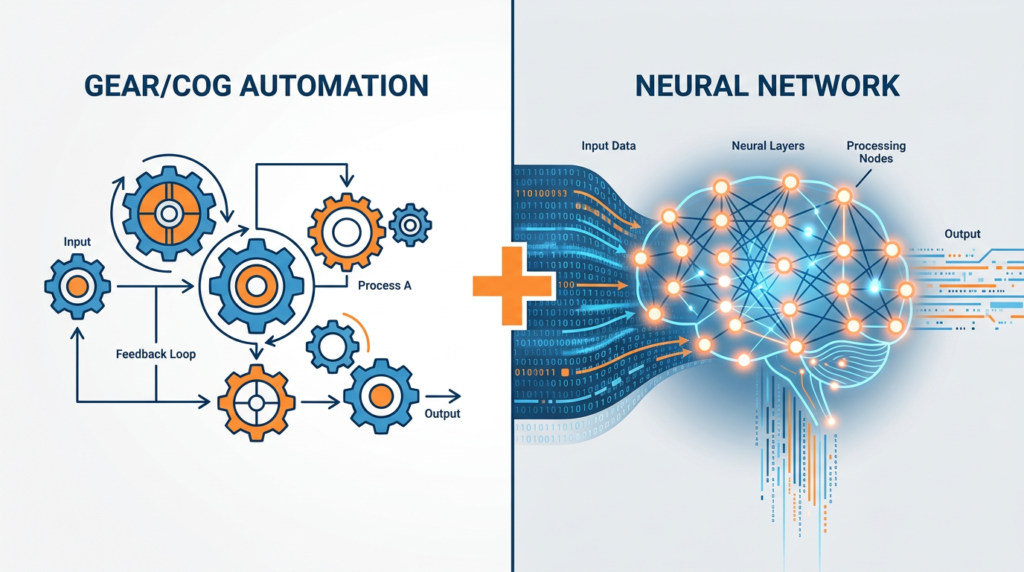
Automation is rule-based. You tell it: “When X happens, do Y.” Example: When someone fills out my contact form, automatically add them to my email list and send a welcome message. It follows instructions. It doesn’t think.
Artificial intelligence adds a brain. It can analyze data, recognize patterns, generate content, and make decisions that weren’t explicitly programmed. Example: An AI reads 500 customer support tickets and categorizes them by sentiment and urgency—something you’d never hard-code rules for.
The magic happens when you combine both. You use workflow automation as the skeleton (moving data between apps) and AI as the brain (making smart decisions at each step). That’s the real digital transformation play, and it’s why companies that get this right see 30-50% productivity gains.
The No-Code Automation Tools That Actually Matter
I’ve tested dozens of platforms over the years. Here are the ones I keep coming back to—and the ones I actually recommend to people who ask me “where do I start?”
- Zapier — The gateway drug of automation. Connects 6,000+ apps. Perfect for simple “if this, then that” workflows. Start here if you’ve never automated anything.
- Make (formerly Integromat) — More powerful than Zapier for complex, multi-step workflows. Visual builder is excellent. Better value on paid plans.
- n8n — Open-source, self-hostable. If you want full control and don’t mind a slightly steeper learning curve, this is the power-user pick.
- ChatGPT / Claude — Not “automation” in the traditional sense, but I use these daily for content drafting, data analysis, brainstorming, and code generation. They’re the AI layer you plug into your automations.
- Google Apps Script — Free, built into Google Workspace. Surprisingly powerful for automating spreadsheets, docs, and email workflows.
The key insight most people miss: you don’t pick one tool. You build a stack. I run Zapier for simple triggers, Make for complex workflows, and ChatGPT as the AI brain that processes data at key decision points. That combination handles about 80% of my business productivity automation. Want to see how people are turning these tools into income? Check out my guide on AI side hustles for 2026.
Machine Learning Basics: The 5-Minute Version
You don’t need to understand machine learning basics to use AI tools—but having a mental model helps you use them better. So here’s the shortest useful explanation I can give you.
Traditional software: Human writes rules → Computer follows rules.
Machine learning: Human provides data → Computer discovers rules.
That’s it. That’s the core difference. When you use ChatGPT, you’re interacting with a model that “learned” patterns from massive amounts of text data. Nobody programmed it to write a marketing email—it figured out the pattern from millions of examples.
Three types you should know about:
- Supervised Learning — You give it labeled examples (“this email is spam, this one isn’t”) and it learns to classify new ones. Powers most recommendation engines.
- Unsupervised Learning — You give it raw data and it finds patterns on its own. Great for customer segmentation.
- Reinforcement Learning — The model learns by trial and error, getting “rewards” for good outcomes. This is how game-playing AIs and robotics systems train.
For a deeper technical foundation, Johns Hopkins University published an excellent analysis on how AI and human workers will coexist—worth reading if you want the academic perspective.
Expert Commentary: Simplilearn’s comprehensive AI course is one of the best free resources on YouTube—I recommend watching at least the first 30 minutes to solidify the foundational concepts I’ve covered above.
Build Your First Workflow Automation in 20 Minutes
Enough theory. Let’s build something. Here’s a dead-simple automation I set up for every new client, and it takes about 20 minutes 🙂
The “New Lead Auto-Responder” Workflow
- Trigger: Someone submits a Google Form (or Typeform, or any form tool)
- Step 1: Zapier catches the submission and adds the contact to a Google Sheet
- Step 2: Zapier sends the form data to ChatGPT via API with a prompt: “Write a personalized 3-sentence welcome email based on this person’s answers: [form data]”
- Step 3: ChatGPT’s response gets sent as an email via Gmail
- Step 4: A Slack notification pings your team channel with the new lead’s details
Total cost: $0 (on free tiers). Total time saved per lead: ~8 minutes. If you get 10 leads a day, that’s 80 minutes back. Per day. Every day. That’s real business productivity improvement, not theoretical fluff.
The Brookings Institution reports that workers who develop adaptive capacity with AI tools are significantly better positioned in the evolving job market. Building workflows like this is exactly how you develop that capacity.
Advanced Tactics: Where Beginners Become Dangerous

Once you’ve built your first few automations, here’s where you separate yourself from the crowd. These are tactics I rarely see in other beginner AI guides:
1. Chain AI Calls in Sequence
Don’t just use one AI step. I chain 3-4 AI calls in a single workflow. First call summarizes raw data, second call extracts key entities, third call generates a response, fourth call checks the response for quality. Each step refines the output. The result is dramatically better than a single prompt.
2. Build Feedback Loops
Log every AI output and the human correction (if any) into a spreadsheet. After 100 entries, you’ll see exactly where your prompts fail—and you can fix them systematically. This is poor man’s fine-tuning, and it works shockingly well.
3. Use Webhooks Instead of Polling
Most beginners set up automations that “check” for new data every 15 minutes. That’s wasteful and slow. Webhooks push data to your automation instantly when something happens. Nearly every modern app supports them. Use them.
4. Automate Your Automation Monitoring
Set up a meta-automation that checks if your other automations ran successfully. I have a daily digest that tells me which workflows fired, which failed, and why. Takes 10 minutes to build. Saves hours of debugging.
FAQ
What is the easiest way to start with AI and automation?
Start with a no-code automation tool like Zapier or Make. Pick one repetitive task you do daily (like forwarding emails or updating spreadsheets), and automate just that one thing. Once you see the time savings, you’ll naturally want to automate more.
Do I need to know how to code to use AI tools?
No. Most modern AI for beginners tools and automation platforms use visual interfaces or natural language. ChatGPT, Zapier, Make, and dozens of other tools require zero coding knowledge.
How much does it cost to get started with automation tools?
You can start for free. Zapier offers 100 tasks/month, Make offers 1,000 operations/month, and most AI tools have free tiers or trials. A functional automation stack can cost $0 to launch.
Will AI replace my job?
Current research from the Bureau of Labor Statistics and Yale Budget Lab indicates AI augments jobs more than it replaces them. The real risk isn’t AI taking your job—it’s someone who knows how to use AI taking your job.
What is the difference between AI and automation?
Automation follows pre-set rules to complete repetitive tasks (like auto-sending emails). AI adds intelligence—it learns from data, makes decisions, and handles tasks requiring judgment, like analyzing customer sentiment or generating personalized content.
My Top Recommended Gear
If you’re serious about building an AI and automation workflow, here’s the gear I personally use and recommend:
- Logitech MX Master 3S Mouse — When you’re building complex workflows with drag-and-drop interfaces all day, a precision mouse matters more than you’d think. Check price on Amazon
- Dell UltraSharp 27″ 4K Monitor — Automation builders and dashboards demand screen real estate. I run dual 27″ monitors and it changed my workflow completely. Check price on Amazon
- “AI Superpowers” by Kai-Fu Lee (Book) — The single best book I’ve read on understanding where AI is headed and how to position yourself. Essential reading for anyone starting this journey. Check price on Amazon
Disclaimer: This post contains affiliate links. As an Amazon Associate, I may earn a commission from qualifying purchases at no additional cost to you.